App Preview
If you want to see the product-shaped web surface before wiring GitHub OAuth, pairing a local agent, or configuring a hosted deployment, start here.
The preview now frames the app as a local-agent control cockpit: the dashboard makes mode and readiness visible, /commands is the central ledger, and task/radar/memory workspaces show how browser intent flows toward a paired local executor.
The One-Command Entry
From the repository root:
npm install
npm run web:preview
Then open http://localhost:3000/dashboard.
This launches the same-repo Next.js app in a read-only preview mode with representative data already seeded for the guest session.
Tracked proof data: web-app-preview-state.json
Maintainer check: npm run web:preview:check
Representative Snapshot
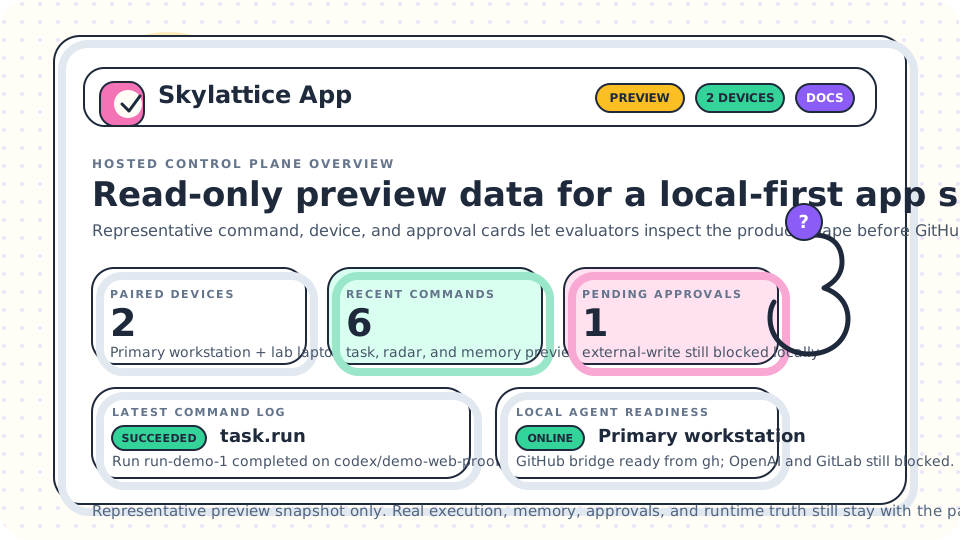
What You Can Inspect
The preview is designed to answer one question fast: does the web product surface look credible enough to keep exploring?
Open these routes first:
/dashboard: current mode, next action, paired-device status, latest commands, approval pressure, and local readiness/commands: central command ledger, lifecycle, routing, payload, result, error, and next-action drill-down/tasks: governed task run shape plus representative result history/radar: scan, schedule validation, replay, and rollback surfaces/memory: search, profile proposals, and review-driven memory actions/connect: pairing flow, code visibility, and claimed-device status/devicesand/approvals: long-lived management surfaces
What The Preview Is
- a truthful first-look entry into the hosted control-plane UX
- a seeded guest session with representative command, device, pairing, and approval records
- a way to evaluate the information architecture and interaction model before live setup
What The Preview Is Not
- not a hosted runtime
- not a live account session
- not connected to a real local agent by default
- not allowed to queue live commands, revoke live devices, or resolve live approvals
The preview is intentionally read-only.
What Changes In Live Mode
When you move from preview to live control, the architecture stays the same but the data becomes real:
- sign in with GitHub
- create a short-lived pairing code
- claim it locally with
skylattice web pair - let the local connector report readiness and claim commands
- inspect command results, failures, approval pressure, and recovery hints from
/commands
The browser still does not become runtime truth. The paired local Skylattice agent remains the executor.
If you are preparing the real hosted deployment rather than a first-look preview, use Hosted Alpha Runbook.